Should I stay or should I go - from Windows to Linux for Audio Software

I have encountered some challenges to upgrade Windows 10 to 11. if it were not for my use of the PC to run my DAW etc, I think I would move to Linux without a second thought.

In fact even my DAW, Reaper is available on Linux, so no problem there. But there is the matter of the VST plugins. Over my years of using Reaper, I accummulated many purchased plug-ins. Now most I’d happily let go. But, what makes me reluctant is Toon Track Easy Drummer, and all the Izotope plugins. I have a full set and do like them. Plus lots of other VSTs, both effects and digital instruments.

And Reaper works on Linux, plus the option to switch to Ardour.

Alternative is a dual boot and only boot into Windows for Reaper.

@Majik not sure if you are familiar with Izotope and digital instruments like EZD. Should I worry about this or just switch to Linux, Reaper/Ardour and rebuild my plugin library with VSTs (or equivalent) compiled for Linux. Perhaps EZD is the one I am most worried about losing. Given all the use over the years, they have paid back the investment.

2 Likes

@DavidP Getting Windows VST3 plugins working on Linux is possible using Wine/Yabridge but there’s no guarantees and the process isn’t particularly easy. I have heard people claim they got Izotope 9 and EZDrummer running, but without any details.

Certainly there will be Linux equivalents for many popular Windows plugins, and some of these will be commercial and some will be free.
Cheers,

Keith

1 Like

Firstly, I researched a little and that made me nervous about the whole idea of trying to get the VST3s compiled for Windows running in Linux with these utilities you’ve mentioned.

I think worth considering a fresh start. Quickly I think the questions I’d ask if doing this would be:

  1. Stay with Reaper or migrate. I am familiar with Reaper which is a strong argument for, but maybe there are worthwhile considerations for eg Ardour or bit
  2. Then is the fx. All the usual suspects.
  3. Lastly digital instruments. Drums, bass, and keys are essential. I also sometimes like to mix in some other strings and brass.
  4. And confirmation that my AI (UMC 404HD) would still work fine.

Maybe there are other questions, maybe it is worth more than one topic? Maybe even a separate sub-category, since I can imagine more people may be interested in this with a view to moving off Windows specifically.

Let me know what you think.

Thanks again, always appreciate your willingness to share your knowledge and experience.

1 Like

My gut feeling is to stay with Reaper. You are familiar with it and your current projects are done in it.

I will note that there’s no animosity between the Ardour devs and any other DAW. When people complain about a certain aspect of Ardour not being as good as (say) Bitwig or Reaper, Paul’s answer is usually something along the lines of ā€œif you want that and it is important to you, Reaper is available and is a fine DAWā€. I guess that’s the beauty of being Open Source and not fighting for customers all the time.

Also Paul Davis has interviewed Justin Frankel (the guy behind Reaper) and has gone on hikes with him.

Another reason to stick with Reaper, as if you are using the built-in ReaPlugs plugins, they should still work. Getting Windows plugins to work on Linux is possible, sometimes. But it’s a big faff!

There’s options for all of those, but they are likely to be different from the ones you are already using, unless you are already using Open Source synths like Surge XT or Vitalium. The commercial Vital synth also is available for Linux.

If you have Soundfonts, there are SF2 and SFZ players for Linux. When I get around to it I will try to list some of these in the thread I was putting together.

100%.

I currently use a UMC204HD (amongst others) on my Linux systems.

Cheers,

Keith

2 Likes

Hi David, I think that it’s a good idea to switch to Linux.
Like you thought possibly doing, I also like to keep the old system on another partition and a dual /multi-boot option for those moments when it’s just simpler to use the well known or bought software. And through running both systems having a smoother switch between the two.

Of course, there’s the danger (and it happened here more than once) that one is staying on both systems for longer than planned :slight_smile:

Dual-boot is an option, Dominique.

And if the Windows boot is kept off the network and just used locally for Reaper then it should be safe. Reaper is remarkable in terms of backwards compatibility. And it meets my needs, so lack of upgrades may not be an issue on Windows, Reaper or Plugins. Provided the plugs in run OK based on local installation and being licensed.

Obviously that all needs some testing. Plus confirmation that Linux can be set up to read files off the various hard discs on my PC as they are currently formatted. From what I saw based on a brief check, there are utilities on Linux that would be able to mount these drives.

Lots to consider, and further research required.

And that will start with greater understanding of the DAW in Linux and availability of suitable plug-ins for fx and digital instruments.

If you used Windows, they should all be NTFS. The older formates were dropped sooo long ago. At least on the Ubuntu I tried last time, it was easy to read those.
Now, I have Linux Mint installed but to be honest I didn’t use it a lot yet.

1 Like

That does make sense, if there are no significant benefits to making a change.

As for ā€˜current projects’ . . . if only :rofl: current focus is just getting back to playing again on a regular basis.

Do like the devs attitude. You are probably right in that if there is not a huge profit issue hanging over things then people may be just better human beings. Best I move along before I begin a rant :joy:

I use some of the stock Reaper but also many others from Waves, iZotope, and other odds and ends.

Though probably for my needs those were all rabbit warrens, let alone holes, I probably never needed to venture into.

No, very little synths. Mostly drums (EZD), bass (Modo Bass) and a Native Instrumens piano. Then I had a whole bunch of other things, like (I think) Spitfire for an orchestra. But there was a synth thing with a vast library of samples. Can’t now recall what it is called.

Well great, one box ticked :grin:

To give a bit more clarity around this:

Running Windows software under Linux has been possible, for the last couple of decades, through a compatibility layer called Wine. This is an application that translates Windows API calls to an equivalent Linux one.

Wine works well to run a wide range of Windows applications, including Guitar Pro and even some games. But it’s design for full applications, not for add-ons like VST plugins.

So, to cater for those, some enterprising developers have produced a range of options, including LinVST and Yabridge. I will focus on Yabridge here, because it’s the more recent, and more promising, of the solutions. From the Yabridge README:

Yabridge seamlessly supports using both 32-bit and 64-bit Windows VST2, VST3, and CLAP plugins in 64-bit Linux plugin hosts as if they were native plugins, with optional support for plugin groups to enable inter-plugin communication for VST2 plugins and quick startup times.

Personally, I have used Yabridge to run a few Windows native VSTs including MTPowerDrumKit2 and Spitfire’s BBC Symphony Orchestra.

BUT…

Not all plugins will work with Yabridge or LinVST. This is partly because many of the plugins rely on a proprietary manager and/or licence management system, such as iLok, and these may not work on Linux. I have had this sort of problem with Roland Cloud, as an example.

Secondly, Yabridge is, currently, a relatively fragile environment. This is because it currently relies on unstable, development versions of Wine libraries, and as they change things, it causes Yabridge to stop working. There are ways to manage this, but it does involve a bit of low-level messing around with your OS.

Note that Robert, the author of Yabridge, is looking at embedding the specific Wine libraries into future versions to remove this issue.

The third thing is, it does require some rather ā€œhands-onā€ configuration to get each VST working. I will leave people who are interested to look at the README rather than describing it here.

Cheers,

Keith

1 Like

Maybe install Linux on an external SSD first to try things out?
(If your USB port is reasonably fast)

At least the basic system is quickly installed, Regarding a nice audio system running smoothly I don’t know so well. Last time I tried I messed something up and then gave up. :blush: But I’m sure it’s easier these days - when I tried, there was a big transition in the Linux world between an older, rather outdated audio system and a newer which still was not as reliable back then.

1 Like

There’s been a number of transitions. OSS to ALSA (c 2003), ESD/aRts to Pulseaudio (2007/2008) and, more recently, Pulseaudio/Jack to Pipewire which is, kind of, still ongoing. I suspect it was this latter one you encountered.

Do give a quick explanation of all of these, ALSA (Advanced Linux Sound Architecture) is baked into the Linux Kernel. It’s a low-level driver similar to ASIO (although it actually has far more capabilities) and replaced the original ā€œOpen Sound Systemā€ (OSS).

ALSA is the low level subsystem that directly provides the drivers for specific hardware devices and presents a unified interface.

Note that Linux does not have the quite same concept of ā€œdriversā€ that Windows has, and is more in line with Mac OSX. On Linux, the drivers are developed as modules that are compiled within ALSA. They are dynamically loaded, but you can’t really ship them independently of the OS.

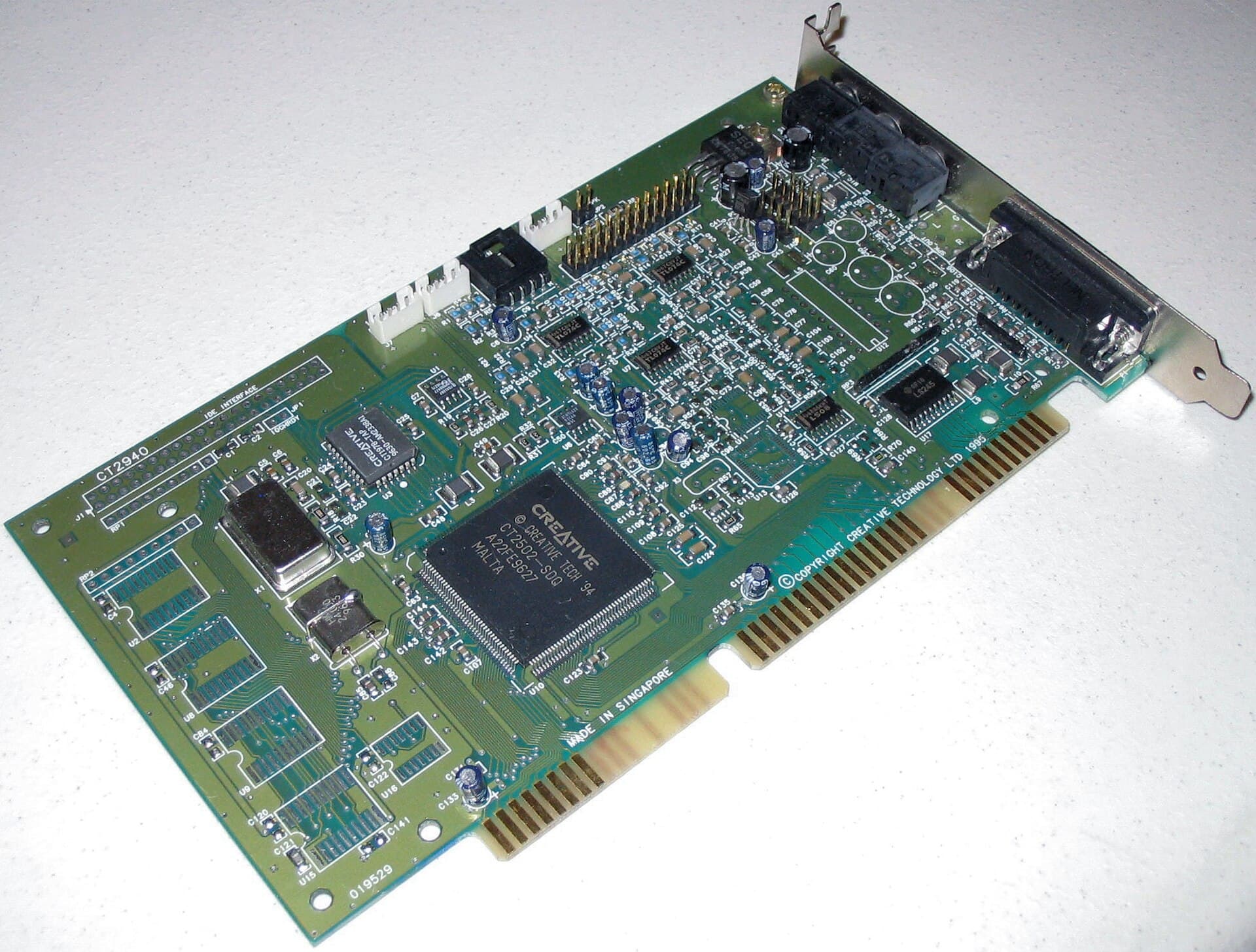
Note that, in the old days, the only way to plug an audio interface into an old-style IBM PC was to open it up and plug a PCB ā€œcardā€ in. Hence the terminology ā€œsound cardā€ is often used:

These days, we have high-speed external ports like USB or Lightning, and almost all audio interfaces plug into one of these. The concept of the ā€œsound cardā€ is largely obsolete, but the terminology still lingers on.

In the world of USB (which will be 99% of the audio interfaces used by people here) there are standards for how USB Audio works. When a USB audio interface is plugged into a PC, it communicates with the PC and describes itself: how many inputs, how many outputs, what resolution, how many MIDI ports, mixing controls, switches, etc.

In Linux (and Mac, and also in Windows, and Android and, I think, in iOS) there is a generic ā€œclass compliantā€ USB driver which should be able to handle any USB audio device plugged into it without any further software being required. Unfortunately, a lot of manufacturers in the early days chose to deviate from that standard and, hence, drivers were required to deal with specific ā€œquirksā€. The Linux kernel is full of code to deal with these ā€œquirksā€, but not every audio interface is supported.

The great news is, increasingly, manufacturers have seen the wisdom of following the standards. Part of this is because they want their devices to work on mobile phones and tablets, where installing a driver isn’t viable.

But whilst ALSA is great for managing audio devices, and it can manage multiple audio devices and applications, it’s not really very good at it. For modern desktop OSs, you need to be able to have multiple applications use multiple devices at the same time, with capabilities like setting volumes for different applications.

On Linux, this was, originally done by various subsystems, known as ā€œdesktop sound serversā€ the main ones being ā€œEnlightened Sound Daemonā€ (ESD) and ā€œAnalog Real-Time Synthesizerā€ (aRts). The latter was part of the KDE Framework, and was extremely powerful, including a full modular synthesis engine.

These were, eventually, replaced by PulseAudio which was a very flexible desktop sound server. It didn’t have a modular synth (shame) but it did support Bluetooth, network audio, and streaming to various streaming audio systems (Airplay, Sonos, etc.). Pulseaudio sits over ALSA.

Around the same time (about 2005) the developer of Ardour, Paul Davis, realised that desktop audio servers were unsuitable for ā€œpro audioā€ work (as the software mixing introduces unacceptable latency and degrades the audio streams), and developed Jack Audio Connection Kit (aka ā€œJACKā€). Jack also sits on ALSA, but provides a way for multiple applications to use a single interface in flexible ways. It includes a low-latency audio routing engine, a way to distribute tempo and clocks, transport controls, and virtual cable capability. JACK has been the default for ā€œpro-audioā€ on Linux since 2005.

With JACK, you can connect a drum sequencer like Hydrogen to a MIDI sequencer, and to a DAW, and have the tempo and beat synchronised between them, pipe MIDI and audio between them, and have the start/record/stop controls on one control all the others. And JACK retained the low-latency of ALSA.

The virtual audio capability was extremely powerful. Here’s a screenshot I found from 2012 when I was doing live hangouts, using JACK for routing:

One problem was that JACK takes full control of whatever audio interface you point it at, so the normal desktop sound server has to be suspended. There were solutions to that, but it was messy.

Along came Pipewire with the aim of unifying things. It provides all of the capabilities of Pulseaudio (and is API compatible with it) and all of the capabilities of JACK (again, with full compatibility). The idea is, you don’t have to mess around with bridges and configuration or swapping between audio servers. It just works! It also works with containerised applications, and can support video streams and virtual cables as well as audio and MIDI.

The problem is, Pipewire has been undergoing fairly rapid development and really is only fairly recently considered stable. Despite this, some distros replaced Pulseaudio with Pipewire early on in it’s development, and this has caused some problems. I suspect it’s this you encountered.

If you have a recent modern distro, the chances are it will have a stable version of Pipewire, although it can be worth checking what the version is. I believe anything past v1.2.x is good (I am currently running v1.4.9 on my Kubuntu systems).

Cheers,

Keith

3 Likes

Keith, such a long text in reply - so I had to read it and have to say it was VERY well written and informative. Thanks a lot!
Increased my wanting to set up another Linux audio system.
Now it makes sense… I remember now I installed some distribution already configured for audio, and it worked quite nicely. It came with Jack. But also read about that newer audio system that promised some extras or lower latency or… I don’t remember what was meant to be better.

So I followed instructions and installed that new system - don’t remember the name but from reading your text, it must have been Pipewire. But well, the audio didn’t work anymore and after working at it some more time, I gave up. I think it was like five years ago (or so).
Generally, I like to do my audio things in Windows, because I used Cubase very very early on (like a midi only simple beginner version in the early 90s) and it’s just easy to stay with something you’re used to.

So thank you, Keith, also for writing the arctiles ā€œnext doorā€ about Linux DAWs and plugins. Very useful and interesting!

2 Likes

Sorry, yes it was a bit of a brain dump and I was trying to cover a lot of ground, possibly in too much detail.

I also got sidetracked a bit at one point. The original reason I mentioned sound cards is that, despite audio interfaces being actual physical sound cards is fairly rare these days, a lot of the terminology used in ALSA still uses ā€œcardā€. For instance, if I list my audio playback devices I get:

$ aplay -l
**** List of PLAYBACK Hardware Devices ****
card 1: XR18 [XR18], device 0: USB Audio [USB Audio]
  Subdevices: 1/1
  Subdevice #0: subdevice #0
card 2: PCH [HDA Intel PCH], device 0: ALC1220 Analog [ALC1220 Analog]
  Subdevices: 1/1
  Subdevice #0: subdevice #0
card 2: PCH [HDA Intel PCH], device 1: ALC1220 Digital [ALC1220 Digital]
  Subdevices: 1/1
  Subdevice #0: subdevice #0
card 3: NVidia [HDA NVidia], device 3: HDMI 0 [DELL U3818DW]
  Subdevices: 1/1
  Subdevice #0: subdevice #0
card 3: NVidia [HDA NVidia], device 7: HDMI 1 [HDMI 1]
  Subdevices: 1/1
  Subdevice #0: subdevice #0
card 3: NVidia [HDA NVidia], device 8: HDMI 2 [HDMI 2]
  Subdevices: 1/1
  Subdevice #0: subdevice #0
card 3: NVidia [HDA NVidia], device 9: HDMI 3 [HDMI 3]
  Subdevices: 1/1
  Subdevice #0: subdevice #0

In reality, none of these are a ā€œcardā€ in the traditional sense, but I didn’t get around to making that point.

Cheers,

Keith

1 Like

Don’t be sorry, I didn’t mean it in a negative way, I was just surprised! It was a great read!

I was just looking at the other thread and found that David splitted both posts of your thread. I would have asked in a common Linux thread the following question, but maybe it fits here quite well.

Keith, you mentioned those audio centered distributions.
Would you recommend one especially?
Or for someone who’s not so experienced with Linux, like David (or slightly lazy these days like me to edit more than one or two configuration files (or even my brain is not working as well as once)) would it work the same to take a standard distribution and add the software?

If audio production is your primary aim, then I would suggest an audio-focussed distro, like AVLinux.

If you want it for more general purpose stuff then, maybe, a more general purpose distro would be better. AVLinux is great, but it uses the Enlightenment Desktop Environment which is good, and very lightweight (great for older PCs and laptops) but some may find it a bit primitive or constraining.

In that case, I would look at, possibly, Ubuntu Studio which uses KDE, which is more like Windows.

The advantage of these creator-focussed distros is that they have already had the technical tweaks applied to make them perform well for real-time, low-latency applications, and they pre-install a lot of popular audio software apps.

All of this is available to other distros, but will require some manual config.

EDIT: As a slight preference for an audio-focussed workstation, I would favour AVLinux over Ubuntu Studio because:

  • It includes an official version of Ardour, if that is important. Ubuntu Studio includes a repackaged version of Ardour which can be ā€œquirkyā€. You can, of course, get the official version and install it yourself.
  • The creator, GMaq, is active on many Linux forums and is very helpful
  • Gmaq also created AVL Drumkits, which is included in AVLinux (again, not difficult to install on Ubunto or other distros)

But for people wanting a more general purpose experience, Ubuntu Studio is probably friendlier.

Cheers,

Keith

1 Like

Looks like it’ll be no problem for Linux to handle most audio stuff to a much higher level than I need to actually use.

Getting other software running on Linux is going to be the interesting part. Some stuff I use is going to be no problem at all. I’ve already been using Open Source software on Windows for a REALLY long time so those I’m not concerned with.

Several programs I’m pretty sure I’ll have to run through Wine and won’t have any trouble doing so.

I use ArcGIS for work and that one is kinda important. I have a license for an older version I bought many years ago (I spent $1600 on that software license!) and I’ll probably have better luck getting that to run in Linux than I will the current version of ArcGIS Pro that I use for work. I do have a work laptop that I usually use, but it’s occasionally been useful to set it up to run some other big processing task on my desktop while I do other things on my laptop. I can’t find any clear answers about that software moving forward with the Windows 10 end of life. There are some sorta vague statements on the developer’s website that make it sound like at some point, they will no longer support Windows 10 with that software, so even setting up a dual boot with Windows 10 on my desktop will be a waste of time (my desktop will not support Win 11).

The one other program I don’t know about is Songbook Pro, which I have deployed across several devices for managing a library of songs. The Windows version is acquired via the Microsoft app store and I can’t find out if it’ll be possible to get it through Wine. It’s such a small program that it also won’t be worth running through a dual boot setup. And maybe I’d have to get used to not using my desktop computer for this purpose? Which is annoying because the way I tend to use my desktop computer when practicing is that my song library is on this computer, and I VERY FREQUENTLY play a song from my library and scroll the songsheet in SBP at the same time.

1 Like

I think the primary issue with Songbook Pro is that it’s not available as a download, only from Microsoft’s walled-garden store. So there’s no way I can see to even try to install it on Linux with Wine.

Your best bet for that is probably a Windows VM, but that’s going to suffer the same issues as dual boot.

The other option may be to run the Android version in something like WayDroid.

No idea about ArcGIS, but this may be of interest.

Cheers,

Keith

1 Like

Well, okay if ArcGIS is possible then that’s helpful.

Turns out I might actually be able to get Win 11 on this machine but I’ve gotta dig into some pretty high level stuff apparently.

So I have the correct TPM 2.0 (I thought I didn’t have it because the Windows tool said I didn’t). And of course this wasn’t immediately apparent because in my BIOS, Gigabyte calls it something else. apparently, the ACTUAL problem is that I don’t have secure boot enabled (which is preventing Windows from ā€œseeingā€ that I have the correct TPM2.0). And in order to address that I have to switch from MBR to the GPT partition style. Which requires that I install the Windows Preinstallation Environment onto a bootable thumb drive. Sweet jeebus what a pain.

I’m not entirely certain yet that I am going to stay on Windows, but at least this would let me run a dual boot setup so I can access ArcGIS Pro without any fussing or needing to worry about ESRI removing support for Win 10.

Waydroid may be the better way to access Songbook Pro in Linux.

1 Like

Hi. Thomas here. Should you stay on Windows or move to Linux. If learning guitar and being creative are your interests, stay with Windows. Linux is a giant time suck. I’ve used Linux for 27 years and still do. For desktop users its about 15 years behind. Yes you can run native DAWs and instruments with low latency but introducing windows vsts running through wine with yabridge will increase the latency (3 to 30 times more) This might change in the future as Steinberg has finally Opensourced Vst3 and ASIO under permissive licenses, but could take years to see change. If you value what is on your NTFS hard drives, DO NOT use Linux to use them. The kernel NTFS driver was maintained by 1 man, and has gone silent. It was janky anyhow. Ardours developer’s use Apple Macs as do most audio developers. It just works. Linux is still a thousand paper cuts. Guitar Pro works perfect in Linux then you go to save your transcription only to find the file picker dialog NewFolder button is missing. So you open your FileManager to create a NewFolder. Then you go back Guitar Pro to save your transcription. And so on. Fun eh! Yes your UMC404HD will work, yes AvLinux will work (but still developed by one man) and based on MxLinux developed by a few people, yes Reaper works, yes Ardour works, yes you can transfer your NTFS files using Windows to exFAT formatted drives so Linux can use them reliably, yes Linux feels like freedom in the short term but then is doesn’t. Linux is outstanding for servers and IOT devices but the desktop is for hobbyist. I produce music in my studio using AMD 5800x, 128gb ram, and a 10 TB NAS file server. For software i use Debian running KDE desktop, Ardour and Reaper, Linux Studio Plugins, NAM lv2 modeller, Dext, SurgeXT VSTis, and MuseScore4 and Audacity for Transciptions and a lot of external outboard gear. Having used this setup for many years and getting older (63) I kept only the NAS, and purchased a Mac Mini 16gb running Arturia V Collection mapped to a KeyLab controller. Couldnt be happier. Everything just works. Time is precious, life is short. I want to be creative not be an IT technician anymore.

1 Like

You could do what I’m doing - stay on Windows 10, enroll in the Extended Security Updates for free, and re-evaluate the situation in 6-9 months. Though, realistically, I expect I’ll stay with Windows 10 for years to come.

1 Like